
Late payments are more than an annoyance—they are a cash-flow risk that can delay your own supplier payments, slow growth, and add hours of awkward follow-up to your week. For service and field-service businesses, where work is already complete before the invoice arrives, the gap between sending a bill and seeing the money can stretch to weeks. If you want to know how to get clients to pay invoices on time, the answer is a billing routine that makes paying the natural next step, not an afterthought.
You do not need to become a credit-control department. A handful of practical changes— clearer terms, easier payment steps, automated reminders, and a single view of what is outstanding—can reduce late payments without damaging client relationships. If you are just looking for a quick way to create a polished invoice, the free invoice generator produces a professional PDF in under a minute with no account needed. Businesses billing the same clients, sites, or jobs each month can also explore our recurring workflows.
Set payment terms clients understand before work begins
The easiest invoice to collect is one the client expected. Agree payment terms during onboarding—not after the first bill lands. State the due date clearly, name the payment method (bank transfer, direct debit, or card), and confirm who at the client's organisation approves invoices. For maintenance contracts, retainers, planned visits, and multi-site work, include these terms in the service agreement and repeat them on every invoice.
When terms are visible and consistent, the client treats payment as part of the service rather than a surprise expense to postpone. A specific calendar date (“Due 14 August 2026”) creates a deadline in the client's mind. Vague phrases like “payment upon receipt” do not.
Remove friction from the payment step
A client who has to log into an unfamiliar portal, look up your bank details in an old email, or phone accounts to pay by card will find reasons to delay. The more steps between opening the invoice and completing payment, the lower the chance it happens today.
Include your bank sort code, account number, and a clear payment reference directly on every invoice PDF. If you accept card payments or bank transfers through an online checkout, make the link prominent and one-click. Suitekore invoices carry payment instructions on every PDF — and when online payments are enabled, a Pay Now button appears on the client's invoice page so they can settle immediately without hunting for bank details.
Send professional invoices with a clear due date
A well-designed invoice signals that you run a serious business and expect to be paid like one. Use your logo, itemise the work clearly, and make the due date one of the most visible elements on the page. Round amounts, clean line items, and a professional layout remove ambiguity—the client sees exactly what they are paying for and when it is due.
Suitekore generates PDF invoices from your saved client, site, and charge information, so every document carries your branding, the correct amount, the agreed payment terms, and a prominent due date. The client receives a single document they can forward to accounts payable without asking you to resend or clarify anything.
Automate reminders so you are not the collections department
Chasing payment by memory is unreliable and, for many small business owners, uncomfortable. Most late payments are not deliberate—the invoice was buried in an inbox, forwarded to the wrong person, or simply overlooked during a busy week. A scheduled reminder, sent a few days after the due date, brings the invoice back to the client's attention without you having to compose an awkward message.
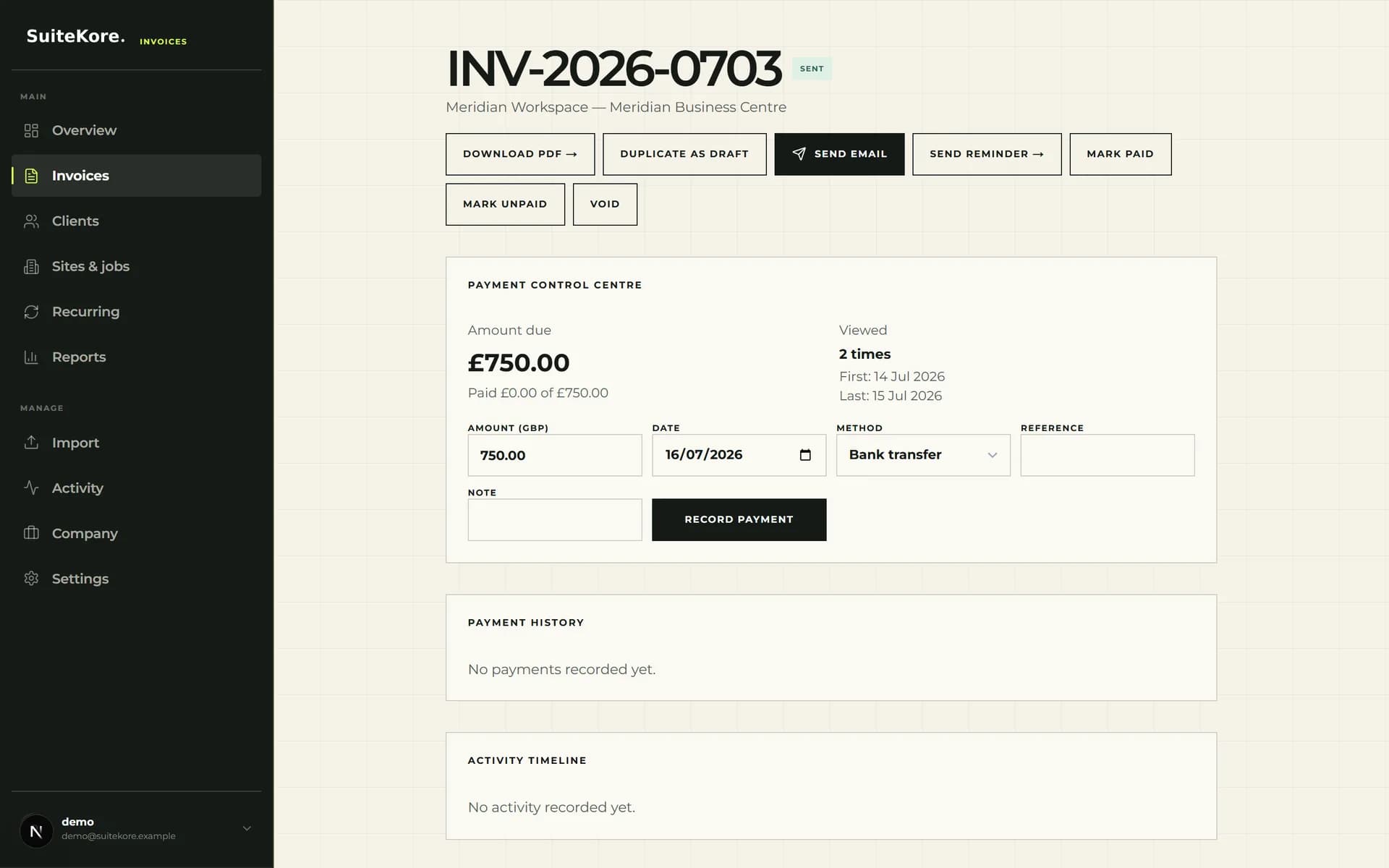
Suitekore lets you send a reminder directly from the invoice page, reattaching the original PDF so the client does not need to search their inbox. One click replaces an hour of inbox archaeology. On paid plans, automatic daily checks can send overdue reminders without manual intervention, so you stay on top of outstanding invoices even during your busiest weeks.
Know who has paid and who has not, at a glance
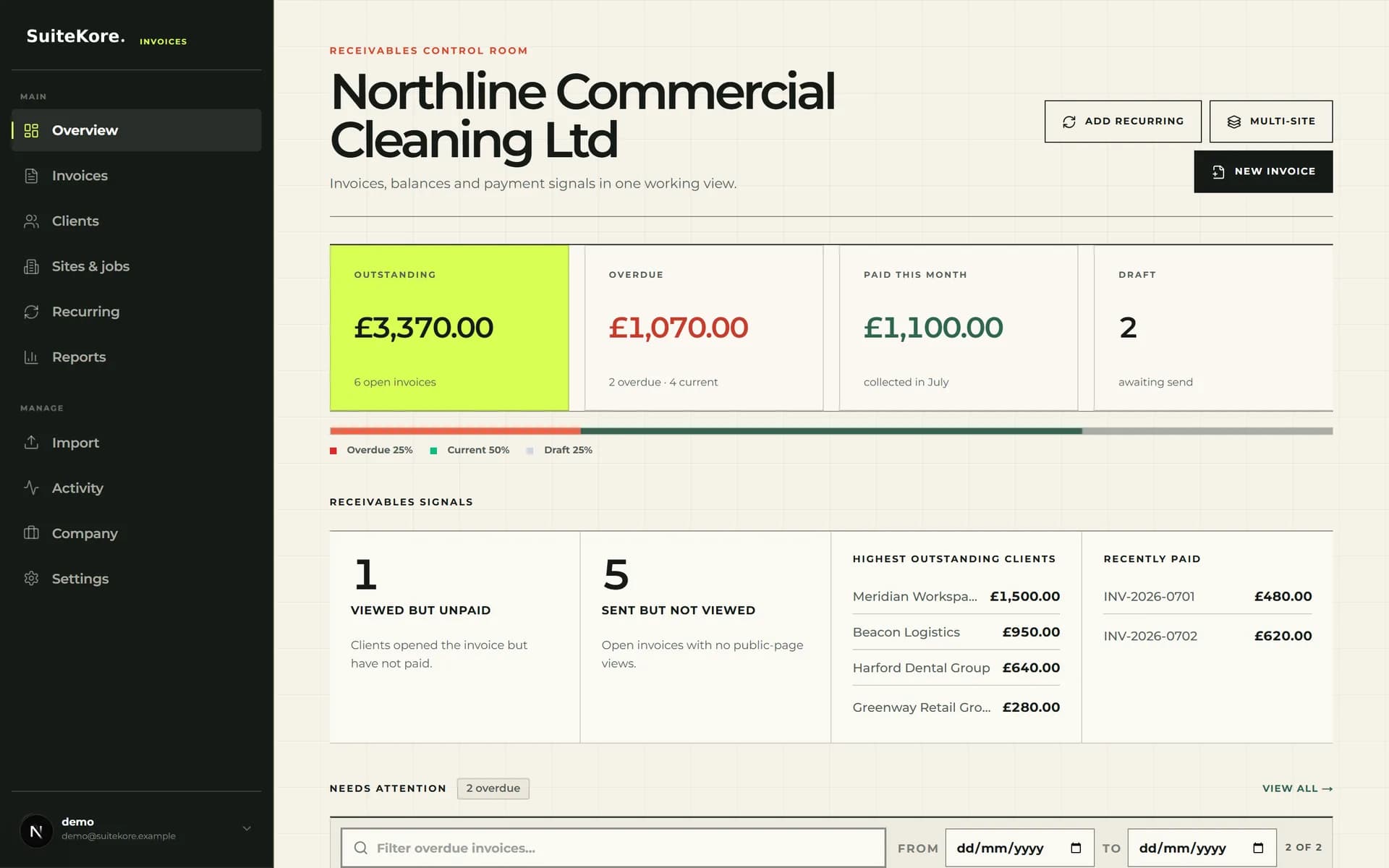
When you send invoices to a dozen clients every month, you need a single view of what is outstanding, what is overdue, and what was paid this week. A dashboard that groups invoices by status—draft, sent, unpaid, overdue, paid—replaces the mental checklist and the spreadsheet. Instead of wondering whether the school in Manchester paid last month, you open one screen and see the answer.
That clarity also tells you which clients need a polite nudge before a small delay becomes a long-term pattern. Suitekore even shows you which invoices a client has viewed but not yet paid, so you know whether the invoice has been seen or genuinely lost. When you know the facts, the follow-up conversation is shorter and more productive.
Follow up and record payment without leaving the page
When a payment does run late, the follow-up should be fast and frictionless. Open the invoice, send a reminder with the PDF reattached, and the status updates automatically. When money arrives—whether by bank transfer, cash, or cheque—record it against the invoice immediately and the dashboard reflects the new balance.
How to remind a client and record payment
A short product walkthrough showing invoice follow-up, status visibility, and payment recording in Suitekore.
Recording payment the moment it arrives is the most important step and the easiest to skip. If you leave it until the end of the month, you risk sending a reminder to a client who already paid—an awkward conversation that damages trust. Suitekore supports partial payments too, so you can record a deposit or staged payment and see the remaining balance update automatically. Mark it paid, move on, and let the system track the rest.
Predictable cash flow with less effort
When payment terms are clear from day one, invoices are professional, reminders are automated, and every status is visible in one dashboard, clients pay more predictably. You spend less time on collections and more time running the business. The goal is not to become a credit-control department—it is to build a billing routine where the path from completed work to cleared payment is short, visible, and repeatable.
You can watch the complete 60-second product demo to see the workflow from dashboard to payment, compare the Suitekore plans, or try the free invoice generator to create a professional PDF right now. If getting the invoice created is the slow part, learn how to turn one billing sentence into a structured invoice draft. For the full process around these six tactics, the complete guide to invoicing for UK service businesses covers every stage from agreed price to recorded payment.