
Invoice software for agencies should support the mix on Suitekore’s industries page: monthly retainers, repeat projects and ongoing client work. The aim is to keep approved client details, billing dates, documents and payment status connected without treating every engagement as identical. The current Suitekore features for repeat billing include clients, sites or jobs, recurring schedules, branded PDFs, email sending, reminders and payment tracking. This guide applies those verified capabilities to an agency workflow, while leaving scope approval, VAT treatment and accounting decisions with your team.
Organise retainers and projects before billing begins
Start with the correct client billing name, email and address. Then decide how each engagement should appear in your records. Suitekore supports clients plus sites or jobs, with notes and recurring amounts. For an agency, a job can separate a retainer or repeat project from other work for the same client, giving staff a clearer reference for the next invoice.
Do not use a saved amount as proof that the scope is still current. Before billing, compare the client, engagement, service period and charge with the latest approved information. If extra work sits outside a retainer, keep it identifiable rather than adding it to a familiar recurring line.
Larger clients often authorise a retainer through a purchase order covering a fixed value or period. Store that reference against the engagement and track the value remaining, because an exhausted purchase order stops invoices matching in a way that looks identical to a client who has simply stopped paying.
Schedule predictable retainers, review changing work
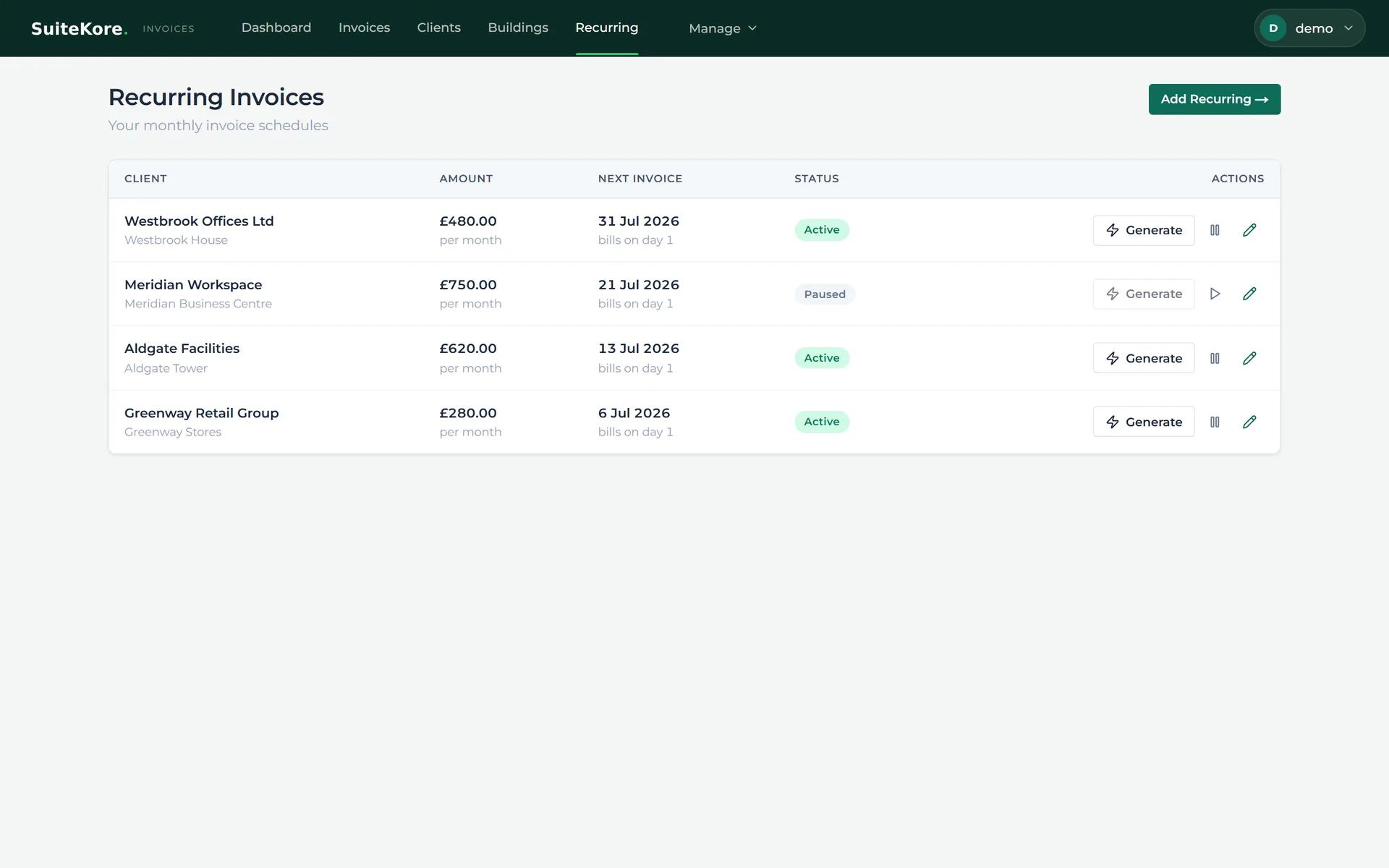
The recurring invoices screen brings the client, monthly amount, next invoice date, delivery method and schedule status into one view. Current controls allow a schedule to be generated, paused or edited. That structure suits a stable monthly retainer once the client details, amount, description and timing have been checked.
Recurring generation should include a review point. Pause or amend a schedule when the engagement changes, and create separate billing for work outside the regular charge. The recurring payment setup guide explains the wider choice between repeat invoices and payment collection, helping teams avoid treating them as the same step.
- Confirm the approved monthly charge and billing date.
- Check whether delivery should create a draft for review.
- Keep one-off project work separate when the scope differs.
Prepare invoices that clients can review clearly
A client-ready document needs more than a total. Suitekore’s feature page states that PDFs can include a logo, billing address, line items, due dates, payment terms and totals. Use specific descriptions for the service period and approved work, then confirm the recipient, dates, VAT treatment and figures before sending.
Keep internal project language out of the final document when it would be unclear to the billing contact. A concise description should connect the invoice with the agreed retainer or project. Invoice software can structure and render the document, but it cannot decide whether the commercial description or tax treatment is correct.
Send, follow up and record the payment trail
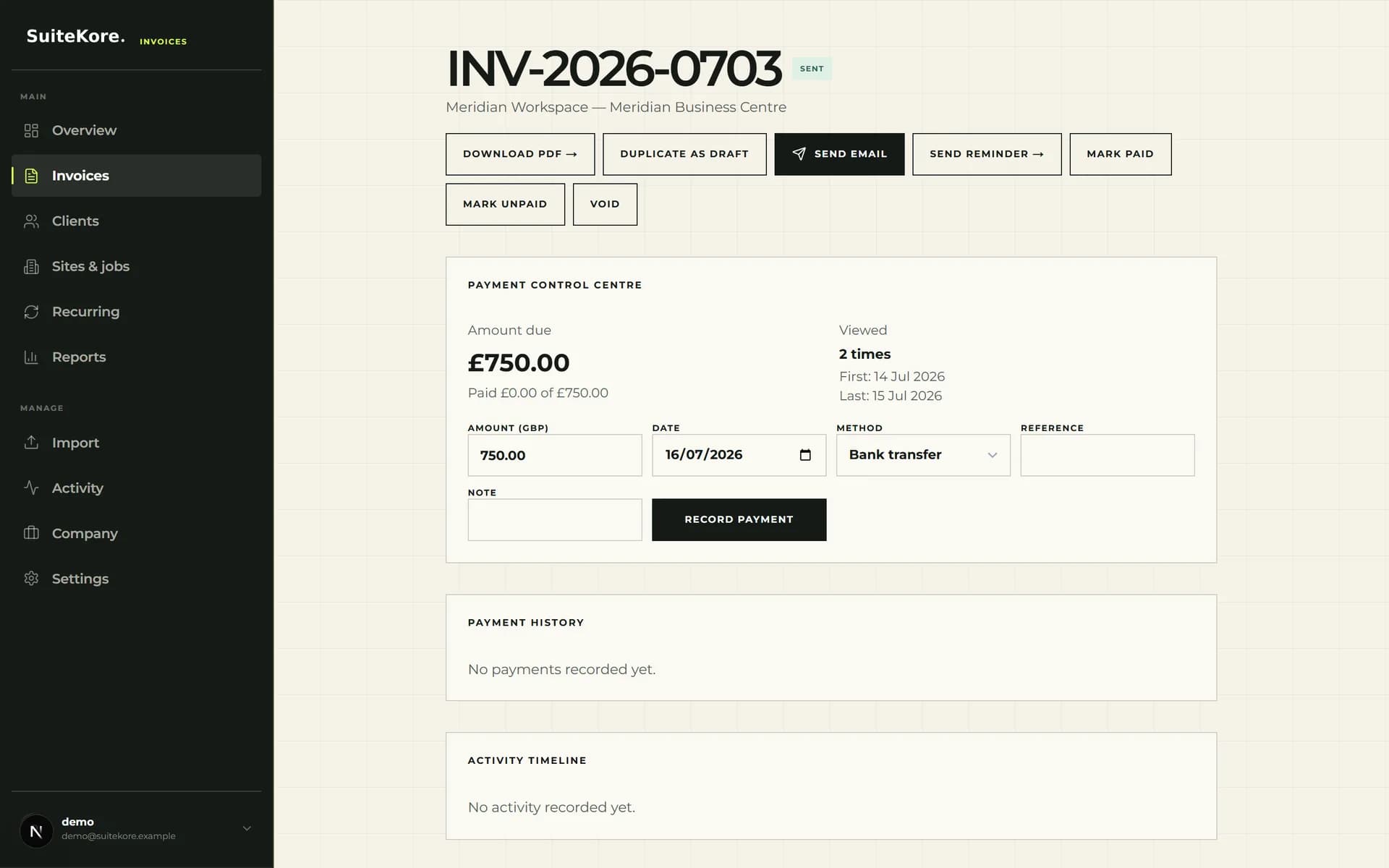
The current invoice detail view groups PDF download, duplication, email, reminder and status actions. Its payment area records an amount, date, method, reference and note, with payment history below. Use these controls after authorised review so the system reflects the invoice sent and money received.
When an invoice becomes overdue, follow a consistent process based on the agreed terms and your records. The guide to getting invoices paid on time covers clearer terms, payment options and reminders. Once funds arrive, record them against the correct invoice, including a useful reference where available.
- Preview the PDF before sending it to the saved contact.
- Use reminders against the correct overdue invoice.
- Record the received amount, date, method and reference.
Review agency receivables as a weekly routine
Suitekore’s dashboard displays outstanding, overdue and paid totals alongside draft numbers. The current screenshot also shows viewed but unpaid invoices, sent invoices without a recorded view, highest outstanding clients and recently paid items. These signals can identify records needing attention, but still require interpretation against your terms and bank activity.
Set a regular review for unapproved drafts, upcoming recurring dates, overdue balances and recently received payments. Give each exception a next action, such as confirming scope, correcting the billing contact, sending a reminder or recording a cleared payment. A short routine is easier to audit than sporadic chasing across unrelated tools.

Test the software against representative agency work
Before subscribing, compare the current Suitekore plans and limits with your numbers of clients, sites or jobs, users and monthly documents. Core, Growth and Agency are the current paid plans, with different published limits and capabilities. Check the live pricing page rather than assuming every tier has the same allowance.
Run realistic examples through the process: one stable retainer, one changing repeat project and one overdue invoice. Confirm that staff can find the correct engagement, review the draft, produce a clear PDF, send it and record payment. This test shows whether the workflow fits your approval habits and where another project, accounting or specialist system may still be needed.