Invoice software for landscapers should keep each client, site, recurring charge and payment status connected. That matters when a grounds business combines repeat visits with seasonal work and one-off jobs. Suitekore supports clients, sites or jobs, recurring invoice schedules, branded PDFs, email sending, reminders and payment tracking in one workflow. This guide explains how a UK landscaping or grounds-maintenance business can organise that process, what to check before choosing a plan, and where human review still belongs.
Start with a clear record for every landscaping site
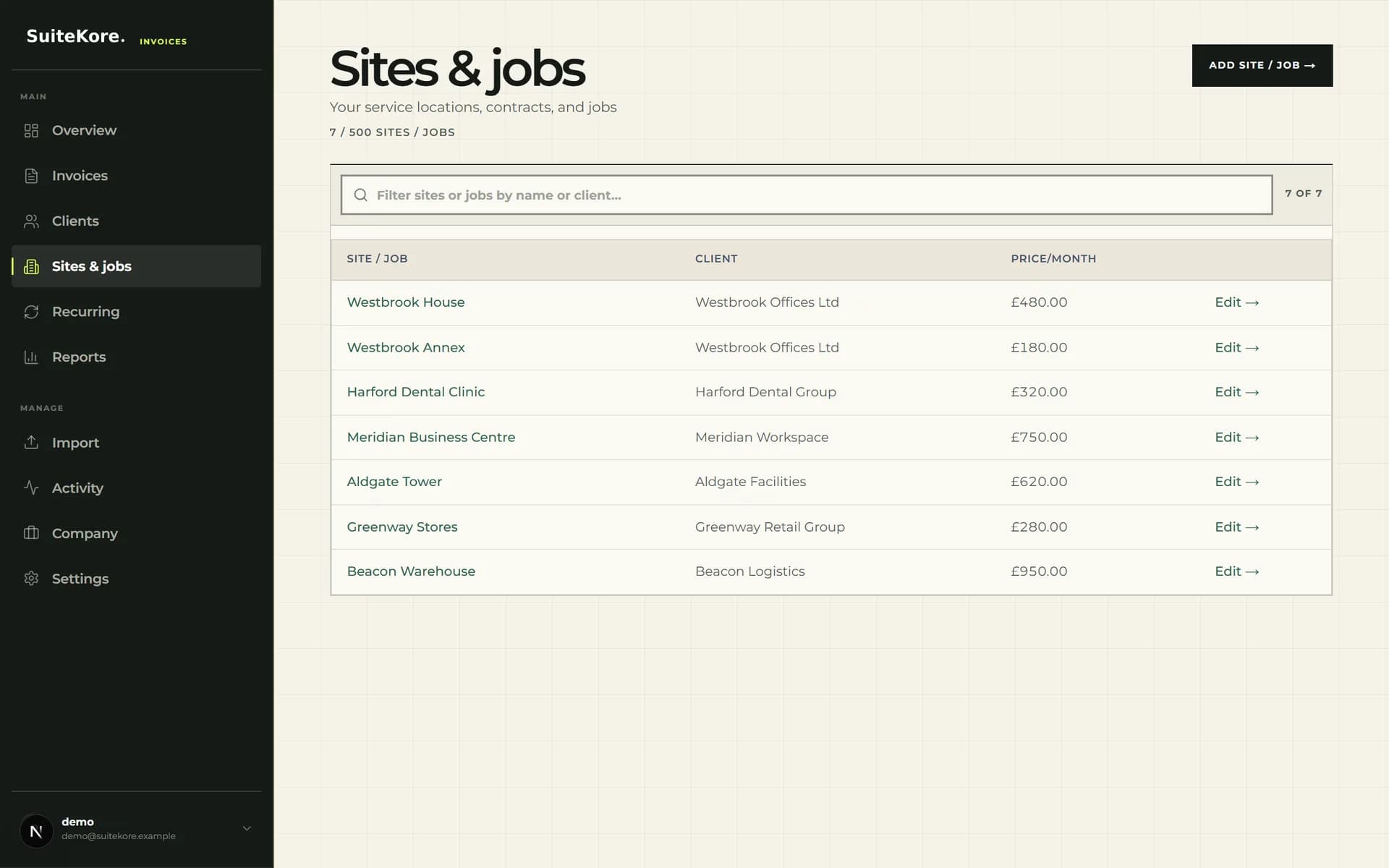
Suitekore describes landscaping and grounds work as a fit for repeat visits, seasonal work and client-site contracts. A site-first record helps reflect that structure. Save the client and service location, then keep the recurring monthly charge against the relevant site or job. This creates a consistent starting point before any invoice is generated.
Do not treat the saved charge as a substitute for checking the agreement. Confirm the billing contact, site name, amount and service period against your current records. If a client has several locations, keeping each site distinct makes the source of every charge easier to understand. Review the consolidated invoicing features for multi-site work when that workflow is appropriate.
Check the features that suit recurring grounds work
A useful landscaping invoicing setup should cover the full path from saved work to recorded payment. In the current Suitekore product and pricing catalogue, that includes the following practical capabilities:
- Clients with billing names, email addresses and postal addresses.
- Sites or jobs linked to clients, with notes and recurring charges.
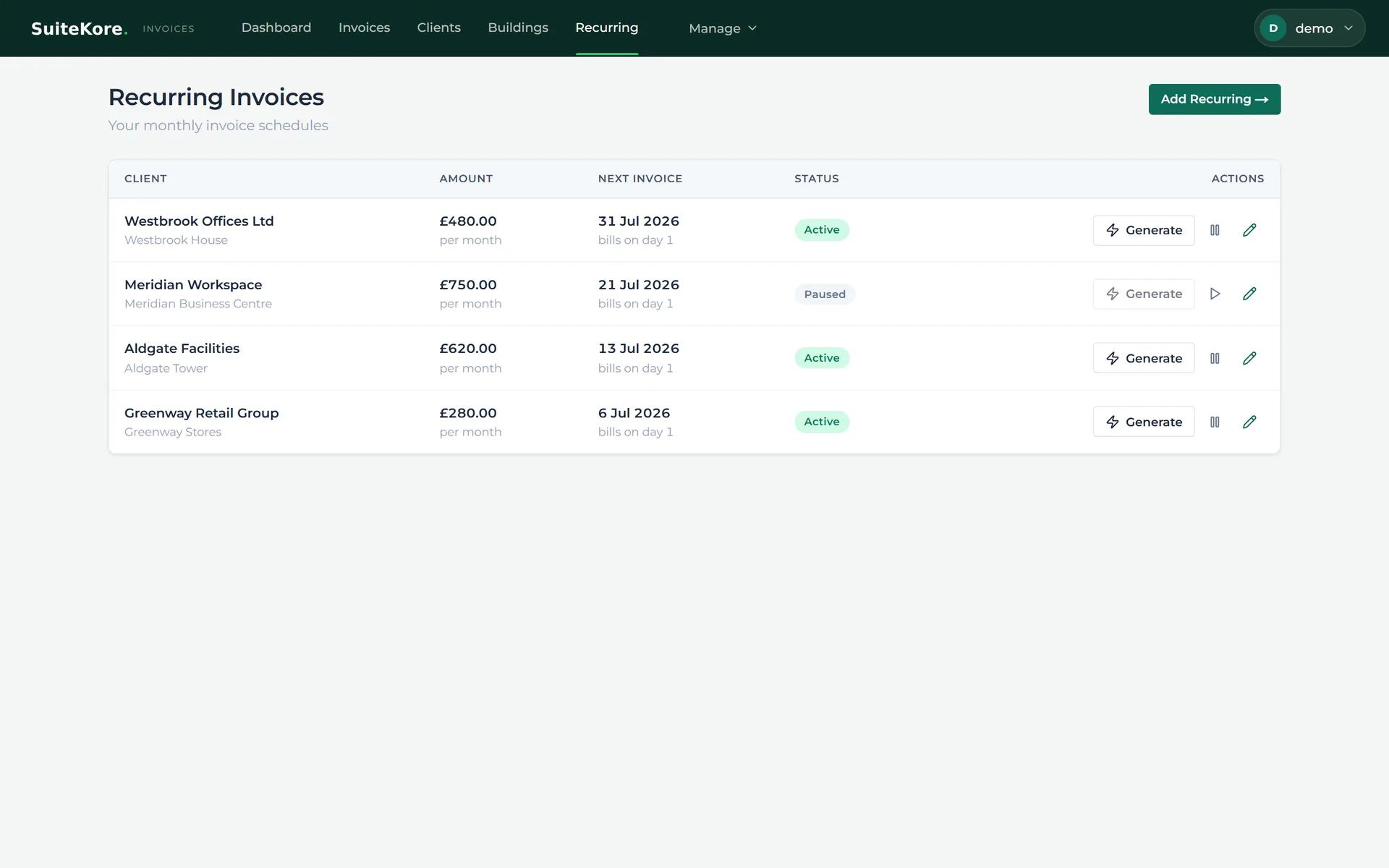
- Recurring schedules with the next invoice date and active or paused status.
- Invoice PDFs containing line items, due dates, payment terms and totals.
- Email sending, reminder actions, online Stripe payments and payment tracking.
Build recurring billing around agreed maintenance charges
For an ongoing grounds-maintenance contract, set up the client and site first, then create the recurring schedule from the saved information. The current recurring screen shows the client, site, monthly amount, next invoice date, delivery method and schedule status together. It also provides controls to generate, pause or edit a schedule.
Review the generated draft before sending it. Check that the line description identifies the work and period clearly, that the due date and terms are correct, and that the amount matches the agreement. The recurring payments guide for small businesses covers the wider setup. Recurring generation removes repeated data entry, but it should not remove commercial oversight when a contract or service scope changes.
Keep seasonal tasks and one-off jobs easy to distinguish
Landscaping businesses may combine repeat site visits with seasonal work or separate jobs. Use clear line descriptions and the correct site or job record so the recipient can see what is being billed. Where the work does not belong on a regular schedule, create a separate invoice rather than changing a recurring charge merely to force it into the monthly routine.
Suitekore supports invoices, pro formas, delivery notes and credit notes across its current paid plans. Its broader workflow also includes expenses, supplier bills, job profitability, timesheets, overheads, purchase orders, variations and progress billing. Choose only the controls your business needs, then keep supporting information consistent with the underlying job records.
Send, follow up and close the payment loop
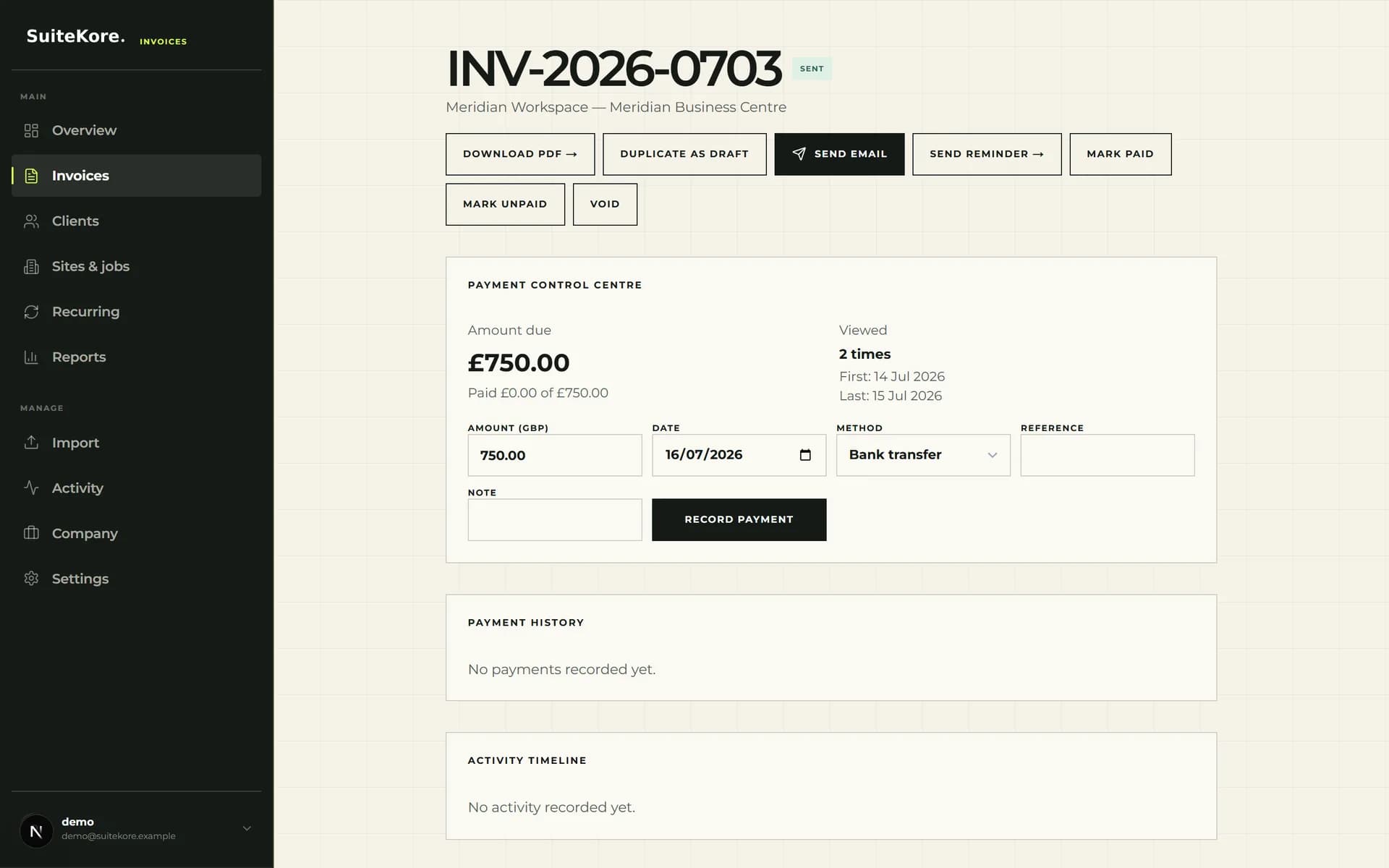
The invoice detail screen keeps download, email, reminder and payment actions beside the invoice status and payment control centre. After reviewing the PDF, send it to the saved billing contact. If payment becomes late, follow the practical guide to dealing with late invoice payments, use a reminder as part of a consistent process, then record the payment date, method and reference when money arrives.
Use this short month-end check to keep recurring and one-off landscaping work visible:
- Confirm completed work belongs to the correct client and site.
- Review recurring schedules, including paused items and next invoice dates.
- Check every draft for service period, terms, amount and recipient.
- Send approved PDFs and review sent, outstanding and overdue statuses.
- Record received payments so the dashboard reflects the current position.
Choose the workflow and plan with evidence
Before subscribing, compare the current Suitekore invoice feature list and current plan prices and limits with your client count, sites or jobs, team size, branding needs and reporting requirements. Suitekore currently offers Core, Growth and Agency plans, each with a card-required 31-day trial that converts to the selected subscription unless cancelled beforehand. Watch the current Suitekore product demonstration and check the signs that spreadsheet invoicing has become limiting before deciding.